• Home
  • About us
  • Piping Stress
    • Caesar II
    • Codes & Standards
    • Static Analysis
    • Piping Supports
    • Spring Hanger
  • Piping Design
    • Piping Layout
    • Piping Materials
  • Piping Jobs
  • Misc.
    • Civil
    • Instrumentation
    • process
    • Frequently Asked Interview Questions
    • Forum
  • Privacy Policy
  • Contact Us

What is Piping

An attempt to explain process piping engineering basics in detail to help all the process piping engineering professionals around the world.

Menu
  • Home
  • About us
  • Piping Stress
    • Caesar II
    • Codes & Standards
    • Static Analysis
    • Piping Supports
    • Spring Hanger
  • Piping Design
    • Piping Layout
    • Piping Materials
  • Piping Jobs
  • Misc.
    • Civil
    • Instrumentation
    • process
    • Frequently Asked Interview Questions
    • Forum
  • Privacy Policy
  • Contact Us
 › Caesar II › Caesar II error › Detail Design › Engineering Tools › Flexibility Analysis › piping stress › piping stress analysis › Piping Stress Analyst › Piping Stress Engineer › static analysis › Tempmat error › Caesar II Error: “Could Not Open TEMPMAT”: Why this is generated and steps to overcome it

Caesar II Error: “Could Not Open TEMPMAT”: Why this is generated and steps to overcome it

want2learn November 5, 2016     No Comment    

LinkedIn0
Facebook7
Google+0
Pinterest0
Twitter0

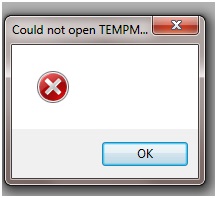
Sometimes, while working with Caesar II software during opening a CAESAR II Piping Input files, many of you might have come across an error similar to the one shown in Fig. 1 (Could not open TEMPMAT). In this context you click on Ok button and proceed for your analysis. But every time you open the input spreadsheet the same error appears each time which is very annoying. So this small article will highlight the steps which you can take to avoid such error.

TEMPMAT ERROR

Fig.1: Caesar II TEMPMAT Error

Now what the TEMPMAT is and how this error is generated. Basically, whenever the piping input file is opened a temporary material properties file, TEMPMAT is created for easier access to the material properties from the Caesar II material database. The file gets automatically closed and deleted when the Analysis begins or when the Piping Input file is closed by the user.

There could be various reasons for this error. The most probable cause for this error is an access violation or insufficient user access rights. The probable reasons and remedies for this error are listed below:

  1. If sometimes while running the Caesar file, the run does not complete or while opening the input spreadsheet the input window does not open due to some reason, i.e, Caesar II program does not complete its intended operation you will find the error to appear when you close the file and try to open again.
  2. If the Piping Input file is on a shared network drive (Such as in some server as people often keep files in common server for easy access to all stress engineers) with several users having access to it at the same time the same error generates. In such situation it is recommended to create a UserID string in the C2 configuration file (Miscellaneous Options Category, “User ID” value) for each user PC. The UserID should be between 2 and 4 characters long and must not contain any special characters (stars, dots, etc.) or spaces. This is NOT a password of any kind; and is NOT a personal key. This UserID must be unique to the machine where CAESAR II program is running. After adding the value, Save and Exit the Configuration Editor (use the blue diskette button on the upper left of the toolbar). All the CAESAR II intermediate workflow items will be appended with this unique UserID string to distinguish them from other users’ files.
  3. If the job (Piping Input file) is located on a local machine, then verify the job directory “user permissions” to allow “full access” (create/modify/delete files and folders).
  4. If the job (the Piping Input file) was recovered from a storage device (such as CD/DVD, or a backup drive), then the file would be read-only by default. So verify that the job itself is not write-protected or read-only.
  5. If still the problem persists simply restart your PC and the problem will not appear.

Related posts:

  1. Piping Stress Engineer with 6 years Experience is required for Dubai
  2. Step by Step Method of Fatigue Analysis of a Piping System Using Caesar II
  3. Piping Stress Engineer required for Philadelphia (Experience: 5 yrs+)
  4. Details about CAESAR II Error: “Material is Outside the Temperature Range”.
  5. Lead Piping Engineer (Piping Stress-10yrs+) required for USA
  6. 8 years experienced Piping Stress Engineer (Offshore) required for Malaysia
  7. Enriched features of Caesar II-2016 (Version 8.0)
Caesar II Caesar II error Detail Design Engineering Tools Flexibility Analysis piping stress piping stress analysis Piping Stress Analyst Piping Stress Engineer static analysis Tempmat error
Caesar IICaesar II errorPiping Stress AnalysisStress AnalysisTEMPMATTEMPMAT Error

 Previous Post

Consideration of Flanged Bend while modeling in Caesar II

― November 2, 2016

Next Post 

Tutorial: Basics of Sustained & Expansion Stresses in Piping system Part 1

― November 6, 2016

Author: want2learn

Related Articles

Showing North Direction and Support TAG

want2learn ― April 2, 2018 | No Comment

Added Features of CAESAR II 2018, Version 10.00

Finally I got the scope to use the latest version of Caesar II 2018 version 10.00 which was released by

want2learn ― March 30, 2018 | 5 Comments

Points to consider while checking a stress system using Caesar II

want2learn ― March 26, 2018 | 3 Comments

Stress Analysis of Centrifugal Compressor Connected Piping Systems using Caesar II: Part 1

want2learn ― March 20, 2018 | 10 Comments

Flange Leakage Evaluation based on NC 3658.3 Method method using Caesar II

want2learn ― March 19, 2018 | 14 Comments

Co-Efficient of Friction for pipe supporting during Stress Analysis using Caesar II

want2learn ― March 19, 2018 | 2 Comments

Slug Flow Analysis Using Dynamic Spectrum Method in Caesar II Part 1 of 2

want2learn ― March 18, 2018 | No Comment

BASICS OF PIPE STRESS ANALYSIS: A PRESENTATION-Part 2 of 2

want2learn ― March 11, 2018 | 4 Comments

Static Method of Wind Analysis of Piping systems in Caesar II using Pressure Vs elevation Method

Leave a Reply Cancel reply

Search this Website

Subscribe For Email Updates

Enter your email address:

Delivered by FeedBurner

Most Popular posts

  • Pressure Tests of Piping systems-Hydrotest Vs Pneumatic Test
  • 11 most important questions & answers from ASME B 31.3 which a Piping stress engineer must know
  • BASICS OF PIPE STRESS ANALYSIS: A PRESENTATION-Part 1 of 2
  • Piping Elbows and Bends: A useful detailed literature for piping engineers
  • Step by Step Methods for WRC 107 and WRC 297 Checking in Caesar II
  • BALL VALVE DESIGN FEATURES: A Literature-Part-3 of 4
  • A brief presentation on Air Cooled Heat Exchangers
  • Top 12 must have Piping books for a begineer into Piping industry
  • Stress Analysis of PSV connected Piping systems using Caesar II
  • Must have Load cases for stress analysis of a typical piping system using Caesar II

Previous Posts

Select Category of Interest

Sitemap

SiteMap